
Queue: retrying failed sends (Pro)
Pro version. This feature is part of the Pro version of Mail Log. What the Free version does is covered under Free version and Pro version.
When sending an e-mail fails, the Free version leaves it there until somebody re-sends it by hand. The Pro version does that for you: it puts the message in a queue and tries again by itself.
How often and how quickly
The wait doubles with every attempt. At the default of 15 minutes that is 15 minutes, 30 minutes, 1 hour and 2 hours — four attempts spread over three and a half hours. That covers the vast majority of outages without pressing a server that is already struggling.
Not every failure is worth repeating
Mail Log tells apart what the mail server reported:
| Kind of failure | What happens |
|---|---|
| Server unreachable, timeout, temporary rejection | Retried. |
| Authentication rejected | Retried, and the failure is noted in the task log — a wrong password does not fix itself. |
| Address does not exist, message rejected for good | Not retried. The message is marked as given up. |
That is not a detail: an address that does not exist will not start existing. Writing to it four times anyway only costs time and, over the long run, damages your domain's standing with recipients.
Switching it on
- In the Options, open the Queue tab and switch on Retry automatically.
- In the Scheduler, create the task Mail Log: work through the queue. Every 5 to 15 minutes is a sensible interval.
Without the task nothing happens. The queue fills up but is never worked through. If you see waiting messages and nothing moves, that is almost always the reason.
The screen
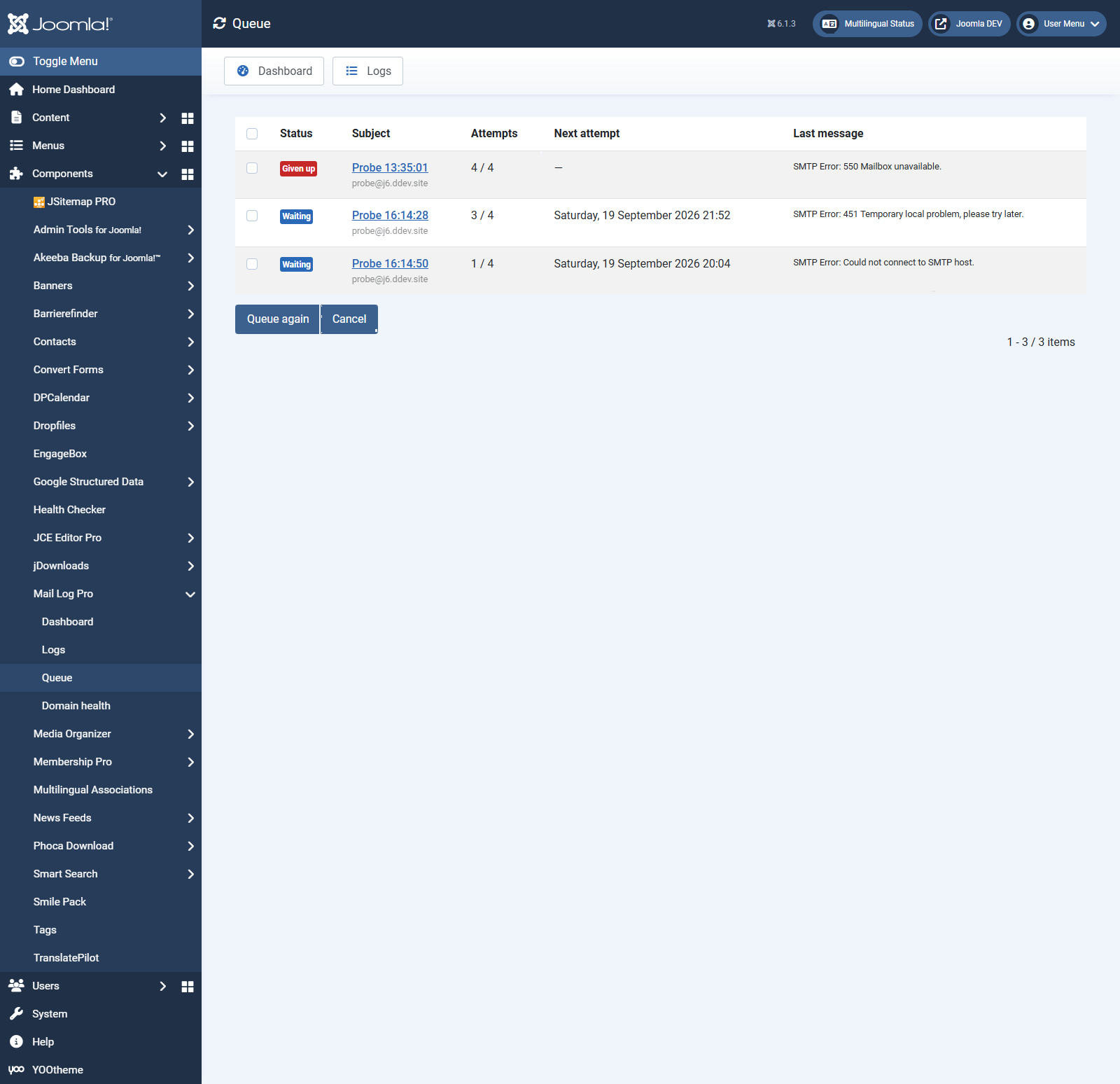
Under Mail Log → Queue you see what is pending: status, subject, how many attempts have been made, when the next one is due, and what the mail server last reported. The subject links to the original log entry.
| Status | Meaning |
|---|---|
| Waiting | The next attempt is still to come. |
| Sending | A run is working on it right now. |
| Delivered | A retry succeeded. |
| Given up | All attempts are used up, or the failure was permanent. |
| Cancelled | Stopped by hand. |
Queue again gives a message that was given up another chance — for instance after you have fixed the cause. Cancel stops a waiting message without deleting it.
Retrying only certain messages
With no rules, every failed message is queued. With rules you narrow that down — say order confirmations but not contact form forwards. The rules work like the log and display rules: pick a field, enter a text, and decide whether one or all of the rules must match.
Limits
- A message is re-sent at most 20 times in total — counted across every route, including the button in the detail view. After that Mail Log refuses further attempts. This limit is what stops a permanently undeliverable recipient from being written to for ever.
- If the original log entry has been deleted — by the cleanup task, for instance — the message can no longer be rebuilt. The job is then given up.
- Only what was logged can be retried. If logging of the message body is switched off, or the mail was classified as sensitive, the content is not available.