
Backup send route (Pro)
Pro version. This feature is part of the Pro version of Mail Log. What the Free version does is covered under Free version and Pro version.
The queue catches failed sends and tries again later. For an order confirmation, that is the right answer. For a password reset e-mail it is far too late: anyone still waiting after fifteen minutes has long since called support.
The backup route is the answer to that. When a send fails, the same message goes out over a second outgoing mail server straight away — in the same page request, with no waiting period.
Setting it up
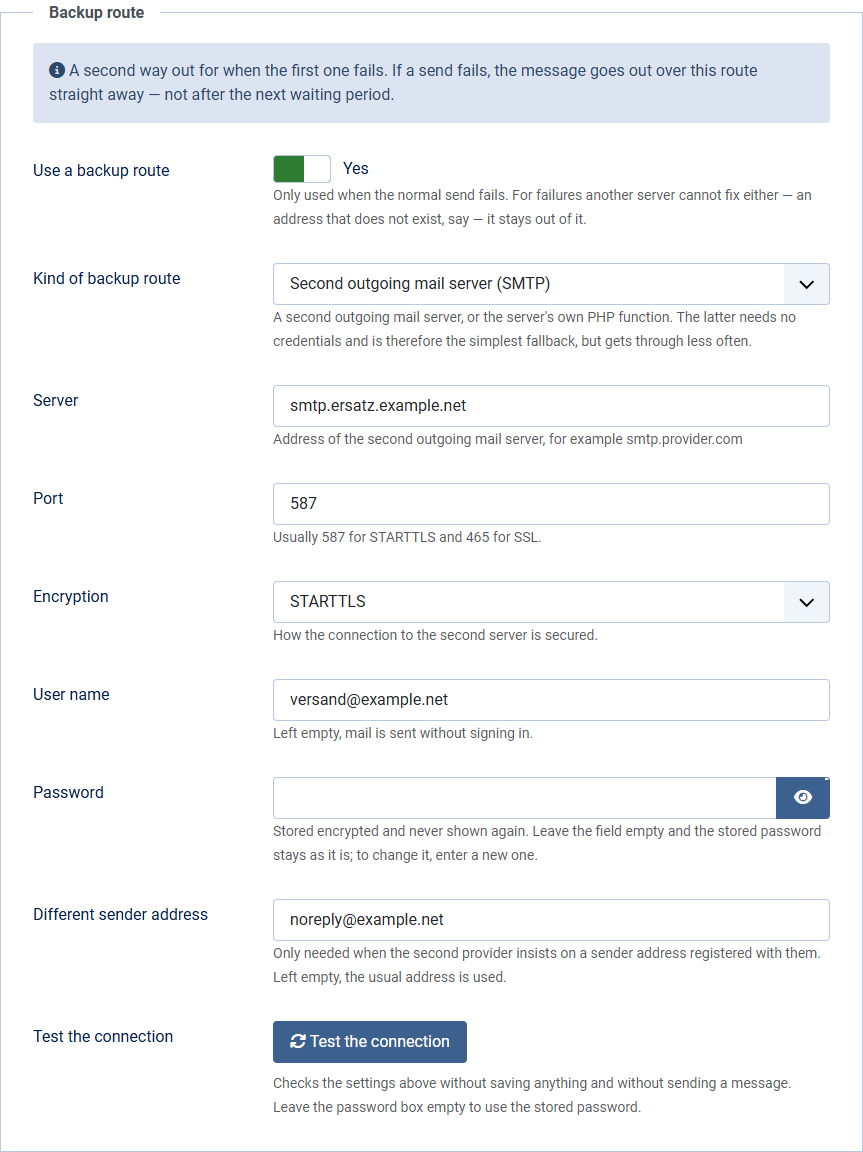
- In Options, open the Backup route tab and switch on Use a backup route.
- Choose the kind: a second outgoing mail server, or the server's own PHP function.
- For a second server, enter server, port, encryption and — where needed — user name and password.
- If the second provider insists on a sender address registered with them, enter it under Different sender address. Otherwise leave the field empty.
The password is stored encrypted and never shown again. Leave the field empty when you save the next time and the stored password stays as it is; to change it, enter a new one.
Testing the connection
Below the credentials sits the Test the connection button. It checks the values currently in the form — so you do not have to save first in order to find out that something is wrong.
- It checks reachability, encryption and, when a user name is set, the login.
- No test mail is sent. Out of a half-configured route it might well reach a real person.
- Leave the password box empty to use the stored password. Joomla never renders a stored password back into the form, so empty is the normal case when you only corrected the server.
- When the test fails, the mail server's own answer is shown underneath — something like 535 Authentication failed. That is usually the most useful part.
Which second route to pick
A second outgoing mail server is the better choice. It should be with a different provider than the first — two accounts with the same provider go down together, and that is exactly what the backup route is meant to protect against.
The server's own PHP function needs no credentials and is therefore set up in a minute. It does get through less often, though: many recipients treat mail sent directly by a web server as unwanted. Better than nothing as a last resort, not something to rely on permanently.
When the backup route does not try
Only for failures another server could fix as well — the outgoing server cannot be reached, the connection drops, the server is overloaded, the sign-in is refused.
For permanent rejections it stays out of it: an address that does not exist does not exist on the second route either, and a rejected message is rejected there too. Two rejections instead of one only damage the reputation of your sender domain.
A backup route with a user name but no readable password is not used. That is the case when the password was never entered, or when the security key of your Joomla installation changed after it was saved. Enter the password again in that case.
What the log shows afterwards
Two entries: the failed attempt over the normal route, and the successful one over the backup route. That is deliberate. A single entry saying "delivered" would hide the fact that the first route went down — and that is precisely the information you run this extension for.
When such pairs start piling up, check the first outgoing server. The backup route is a safeguard, not a repair.
Working together with the queue
The backup route comes first. If the message goes out over it, it has been delivered and is not queued as well. If it fails too, the queue takes over as usual and tries again later — over the normal route.
Together, the two are the complete safeguard: the backup route for what has to go out now, the queue for everything that can wait.