
The periodic report (Pro)
Pro version. This feature is part of the Pro version of Mail Log. What the Free version does is covered under Free version and Pro version.
The dashboard answers the question "is mail still working?" — but only when somebody looks. The report turns that round: it arrives on its own, at a fixed interval, by e-mail.
What is in it
- How many messages went out, how many were delivered and how many failed — each compared with the period before. "48 messages" says nothing; "48 messages, 6 failed, twice as many as last week" says everything.
- Which extensions sent the most, and where something went wrong.
- The most frequent messages from the mail servers.
- The domain health findings — but only those that are not fine.
- How much is waiting in the queue and how much was given up.
The subject line already carries the verdict: whether everything is fine, how many messages could not be delivered, or that your sender domain needs a look. A subject line that always reads the same does not get opened.
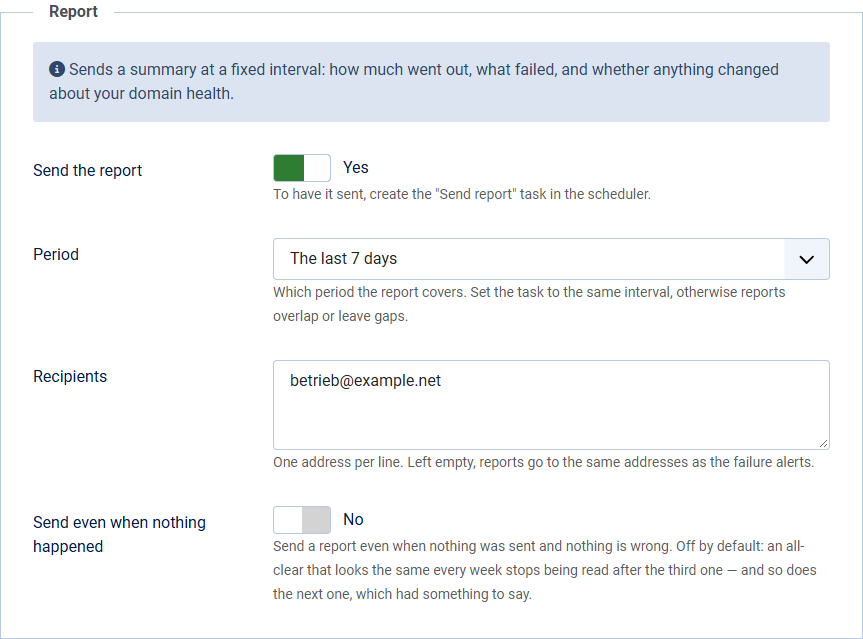
Switching it on
- In the Options, open the Report tab and switch on Send the report.
- Choose the period: 24 hours, 7 days or 30 days.
- Enter the recipients, one address per line. Left empty, reports go to the same addresses as the failure alerts.
- In the Scheduler, create the task Mail Log: send report.
Interval and period have to match. A 7-day report running daily repeats almost the same figures every day; a 24-hour report running weekly misses six days. Set the task's execution rule to the same interval as the period you chose.
Quiet periods
If nothing was sent and nothing is wrong, no report is sent by default. An all-clear that looks the same every week stops being read after the third one — and so does the fourth, which had something to say.
If you want the sign of life anyway, switch on Send even when nothing happened. A failing DNS record triggers a report even in a quiet period, by the way — that is precisely when it is news.
What the report does not contain
No message bodies, no recipient addresses, no attachments. The report is plain text and holds nothing but figures, extension names and server messages.
That is deliberate: it is the only thing this extension sends out of its own accord. A report that needed guarding as carefully as the log it summarises would have missed its point.