
Configuration and permissions
All settings are found under System → Plugins → DPCalendar - Backend Booking. This chapter explains every option and the permissions required.
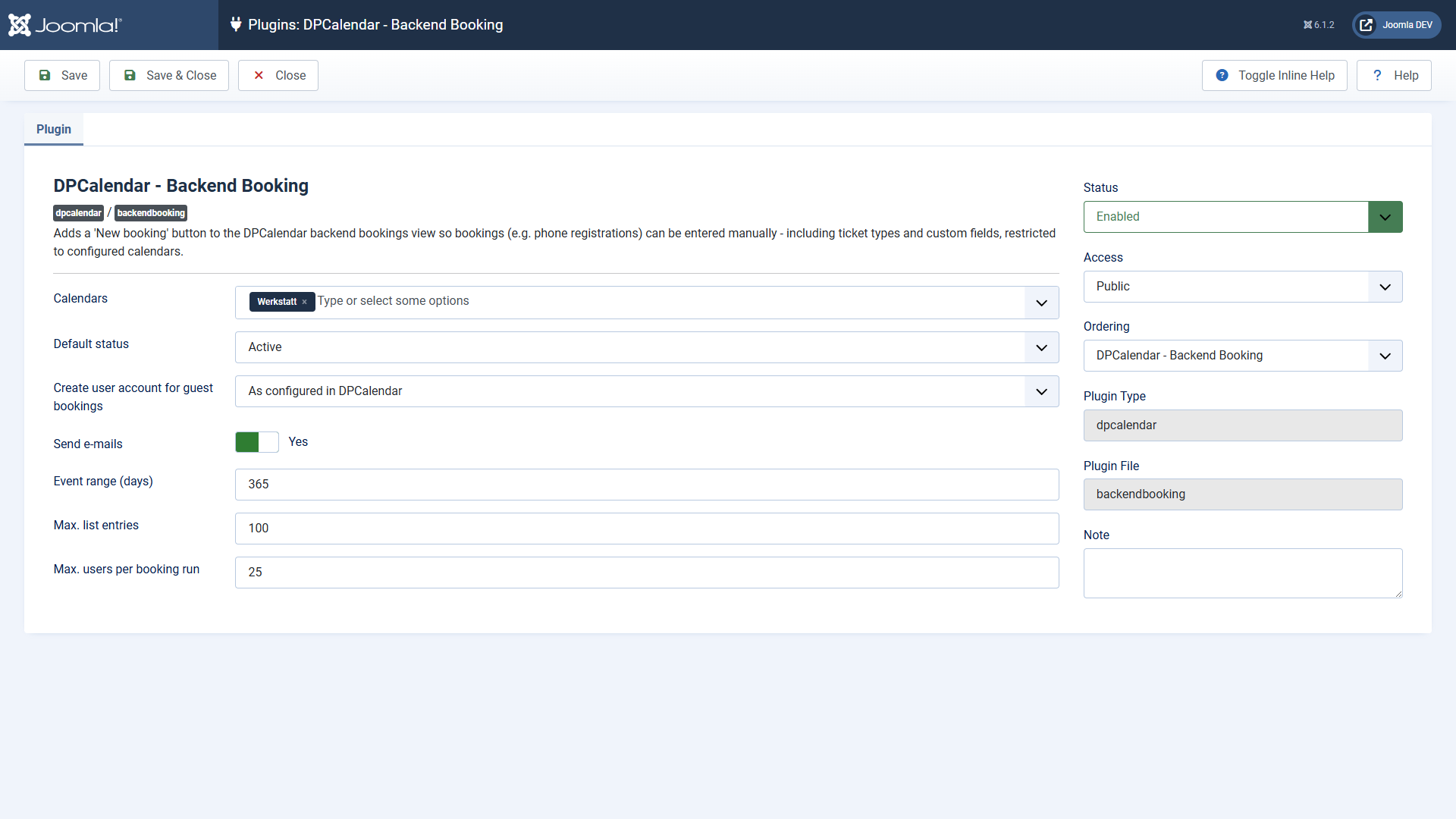
Options
| Option | Default | Meaning |
|---|---|---|
| Calendars | — | Only events of these calendars are bookable in the backend. Subcalendars have to be selected explicitly. With no selection, backend booking is disabled. |
| Default status | Active | Status a new booking receives when the status field is left empty (active, waiting or invited). |
| Create a user account for guest bookings | As configured in DPCalendar | Automatic account creation for guest bookings — details in the chapter A user account for guest bookings. |
| Send emails | Yes | With no, all DPCalendar booking emails are suppressed for backend bookings (confirmation, notification, invoice) — including the registration email of any account creation. |
| Period (days) | 365 | How many days ahead events are offered in the selection. |
| Max. list entries | 100 | Upper limit of the event selection. When it is reached a notice appears; narrow the list down with the filters then. |
| Max. users per booking run | 25 | Upper limit of the multi-user booking. Additionally limited by the PHP setting
max_input_vars. |
Permissions
- Create bookings for other people — the DPCalendar action
dpcalendar.admin.book. You grant it to the user group you want under Components → DPCalendar → Options → Permissions. Super users have it automatically. - Book in the respective calendar — DPCalendar's calendar permission. It applies per calendar and is checked in addition.
- For the automatic account creation, also the Joomla right to create users (permissions of the user manager). Without it, the booking is saved without an account and a warning is shown.
Users without these rights do not even see the New booking button; calling the booking pages directly is refused as well.
Privacy
The plugin stores no data of its own — all recorded bookings live in the regular DPCalendar tables and are subject to their deletion and export mechanisms. The user search of the multi-user booking is available only to authorised backend users and returns name, username and email — the details the Joomla user manager shows anyway.
Applies to version 1.0.8.