
The three source types
Phoca Download Source offers three source types. All three return published content only (and, for documents, approved content).
Single document
Outputs exactly one document — ideal for a highlighted download, such as the current version of a product on the home page.
- Document: chosen from all published downloads.
Documents
Outputs a list of documents. The mode determines how the list comes about:
Mode "manual"
- Documents: multiple selection; for orientation the entries show the category in square brackets (for example [Manuals] User guide).
- Sorting: "manual selection order" keeps the order of your selection; alternatively by title, date, popularity or the Phoca order.
Mode "automatic"
- Categories: one or more categories — or all categories.
- Include subcategories: includes up to four levels of subcategories (see Categories and subcategories).
- Sorting and count (default 20, upper limit 500).
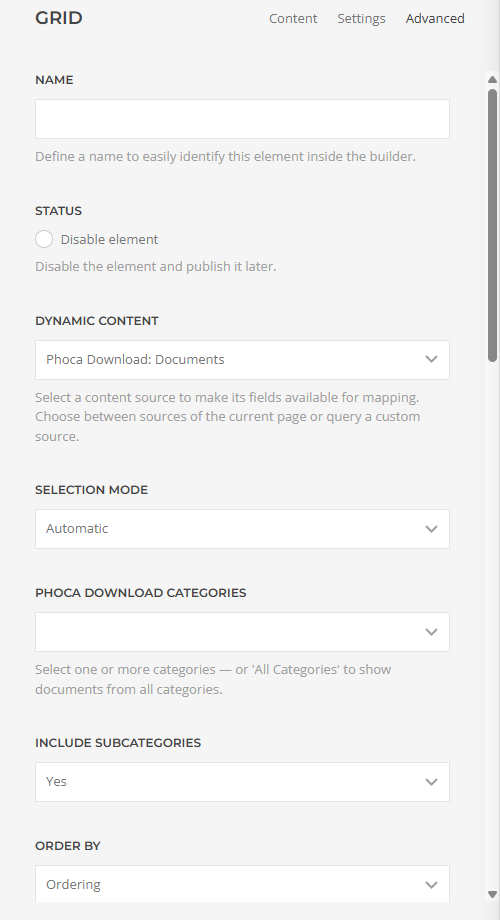
Automatic mode is the choice for "living" download areas: new files in the selected categories appear in the layout immediately, without anyone having to touch the page.
Categories
Outputs download categories — as a tile overview linking to the respective category pages, for instance.
- Mode "manual": a fixed selection of individual categories.
- Mode "automatic": all categories, or the subcategories of a chosen parent category.
- Show empty categories: by default, categories without files are hidden.
- Sorting (order, title, popularity) and count.
The sorting options at a glance
- Manual selection order (document list in "manual" mode only)
- Order — the sorting defined in Phoca Download
- Title A–Z / Title Z–A
- Newest first / Oldest first
- Most popular first — by download counts
Applies to version 1.7.4.