
Configuration reference
All settings are reached through the Options button at the top right of every Media Organizer view. This page lists every option with its default.
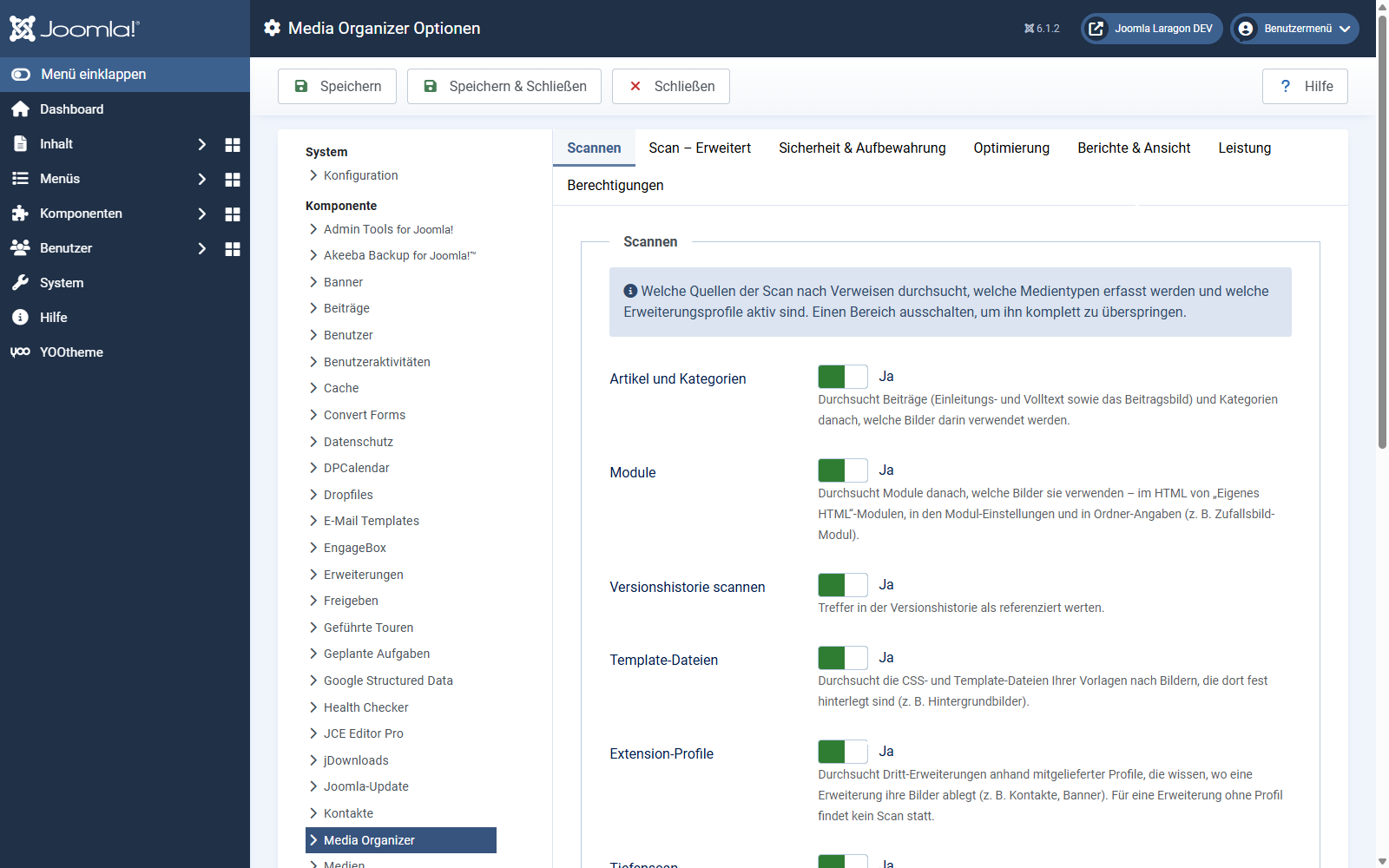
The defaults are deliberately cautious and suitable for most websites. Change only what you have understood — especially in the tab security & retention.
Scanning
Here you switch the search areas on and off. All of them are active by default.
| Option | Default | Meaning |
|---|---|---|
| Articles and categories | Yes | Articles (intro/full text, article image) and categories. |
| Modules | Yes | Module HTML, module settings and folder entries. |
| Scan version history | Yes | Count hits in the version history as referenced. |
| Template files | Yes | Images hard-coded in CSS and template files. |
| Extension profiles | Yes | Third-party extensions with a profile. |
| Deep scan | Yes | Catch-all scan across all database tables. |
| Active media types | Image | Which types are inventoried: image, document, video, audio, font, archive, other. |
| Available profiles | — | Display only: which profiles exist. |
Scan – advanced
| Option | Default | Meaning |
|---|---|---|
| Root directories | empty | Which media adapters are inventoried. Empty = the default adapter local-images. For media under media/, create a directory there in the media component and enter the adapter here. |
| Excluded paths | empty | One entry per line. A folder path excludes the folder including subfolders; glob patterns such as *.tmp work too. |
| Protected core folders | administrator, api, bin, cache, cli, components, includes, installation, jimgo_quarantine, language, layouts, libraries, modules, plugins, templates, tmp | Never recorded. Protection against deleting system files. media/ is deliberately not among them. |
| Deep scan: excluded tables | empty | In addition to the built-in exclusions. |
| Media-free extensions | empty | Components without media references. They count as covered. |
| Detected media-free extensions | — | Display only: extensions already verified. |
| Count the trash | Yes | Items in the trash reference their files as well. |
| Count unpublished items | Yes | Unpublished items likewise. |
| Count module folders | Yes | Treat folder parameters as folder references. |
| Custom field media types | media, imagelist, mediajce, mediafile, acfgallery, acfupload, acfdownloadbutton, acfhtml5audio, acfvideo | Which custom field types contain media. Used but not searched ⇒ deleting stays blocked. |
| Normalise Unicode (NFC) | Yes | Unifies umlauts before comparing. Leave it on when in doubt. |
| Known website URLs | empty | One URL per line. Absolute URLs on these hosts count as local. |
Security & retention
This tab controls when deleting is allowed at all. Every relaxation here lowers your safety net.
| Option | Default | Meaning |
|---|---|---|
| Retention: images | 30 days | For this long a file of this type has to sit in quarantine before it may be deleted. 0 = never released automatically. The period is a precondition, not a trigger — after it expires, nothing happens by itself. |
| Retention: documents | 180 days | |
| Retention: video | 90 days | |
| Retention: audio | 90 days | |
| Retention: fonts | 0 (never) | |
| Retention: archives / other | 180 days | |
| Require a super user for deleting | Yes | Restrict deleting for good to super users. |
| Maximum scan age | 7 days | An older scan cannot authorise deleting. |
| Minimum number of consecutive scans | 2 | A file has to have been a candidate this many times in a row before it may be deleted. |
| Validity of the confirmation token | 300 seconds | How long a confirmation token stays valid. |
| Override the deletion block | No | Super users only. Allows deleting despite incomplete coverage. Is recorded. |
| Reason for the override | empty | Mandatory reason, stored along with it. |
| Quarantine root | jimgo_quarantine | Where files are moved to. Protected with deny files on first use. Do not use the cache folder — it gets emptied. A warning appears if it is inside the web root. |
Optimisation
Thresholds for the report — they only decide what is reported:
| Maximum file size | 500 KB | Larger files are flagged. 0 = off. |
| Maximum edge length | 2500 px | Larger images are flagged. 0 = off. |
| Outdated formats | bmp, tif, tiff | Are flagged as outdated. |
| Modernise from | 150 KB | Raster images above this count as WebP/AVIF candidates. 0 = off. |
| Raster formats to modernise | jpg, jpeg, png, gif | Which formats could change. |
How optimisation works:
| Image library | Automatic | Prefers Imagick, falls back to GD. |
| Maximum edge length (px) | 2560 | Scale down from this edge. Never scales up. 0 = off. |
| JPEG quality | 82 | 1–100. Around 80 is a good compromise. |
| PNG compression | 8 | 0–9, lossless. Higher = smaller and slower. |
| WebP quality | 82 | When the source is already WebP. |
| Remove metadata | Yes | Remove EXIF, ICC and comments. |
| Minimum saving | 10 % | Below that the original stays untouched. |
| Maximum source pixels | 0 (automatic) | Skip images that are too large, so that decoding stays within memory. 0 derives the limit from the PHP memory limit — recommended. |
| Images per step | 5 | How many images are optimised per request. |
| Editor export quality | 82 | Default quality for images from the editor. |
| Backup location | jimgo_optimize_backup | Where originals are backed up before optimisation. Is protected. |
External optimisers (optional, see the chapter of its own):
| Use external optimisers | Yes | Uses pngquant, oxipng, jpegoptim, cwebp, gifsicle where available. Falls back automatically when a tool is missing. |
| Optimiser directory | empty | Empty = search the system PATH. Nothing is downloaded or shipped along. |
| Available optimisers | — | Display only: what was detected. |
| JPEG / PNG / WebP / GIF optimiser | Automatic | Which tool per format. For PNG: pngquant is lossy (the biggest saving), oxipng and OptiPNG are lossless. |
| PNG minimum / target quality | 60 / 82 | pngquant limits. If the minimum quality is not reached, the PNG stays unchanged. |
Reports & view
| Entries per page | 50 | Default page size of all lists. The selection in the page footer takes precedence. |
| Hide providers from broken references | history | Their hits never appear as a broken reference. |
| History tables | #__history | Deep scan hits in them do not count as a broken reference. |
Performance
| Database chunk (rows) | 500 | How many rows the scan reads at once. Smaller = gentler on memory. |
| Keep scan detail data | 5 | For how many of the last scans the occurrence details are kept. The scan overview is kept regardless. |
| Calculate file hashes | Yes | Needed for duplicates and to detect changes. Switching it off makes the scan minimally faster — and the deletion gate blinder. |
| Cache thumbnails | Yes | Creates scaled-down previews under media/com_jimgo/thumbs. Requires PHP GD. |
| Thumbnail size | 360 px | Longest edge of the thumbnails. |
Permissions
The standard Joomla tab. See Permissions, export and privacy.
Applies to version 1.0.3.