
DMARC: who sends in your name (Pro)
WirdPro synchronisiertversion. This feature belongs to the Pro version of Mail Log. What the
Free version does is described under Free version and Pro version.
Every day the large e-mail providers send reports about who has been sending in your name and whether that mail could identify itself as yours. These DMARC reports arrive as compressed XML in a mailbox — which is why in practice nobody ever reads them. Mail Log collects them, unpacks them and answers one question from them: is this still our sending?
What a report answers — and what it does not
A report says: “During the day, 42 messages came from this IP address carrying your domain in the sender. 40 of them could identify themselves, 2 could not.” It does not say whether the mail was read, and it names no recipients and no subjects — an aggregate report contains figures, not messages.
“Identify itself” means: the message either carried a valid DKIM signature of your domain or came from a server your SPF record allows. One of the two is enough. That is why a forwarded message is not a problem: forwarding breaks SPF and leaves the signature intact.
Setting it up: three steps
rua=mailto:…. Here you decide where the reports go — unlike the bounce
messages, whose address is dictated by the sending path. Enter the address of the mailbox Mail
Log collects from. Domain health shows you the finished record.
Switch the evaluation on. Options → Return channel → DMARC reports →
Evaluate reports.
Patience for the first one. Providers send once a day and report on the previous day. After publishing the DNS record it therefore takes up to two days for the first report to arrive — and only if mail was sent from your domain during that time.
The DMARC screen
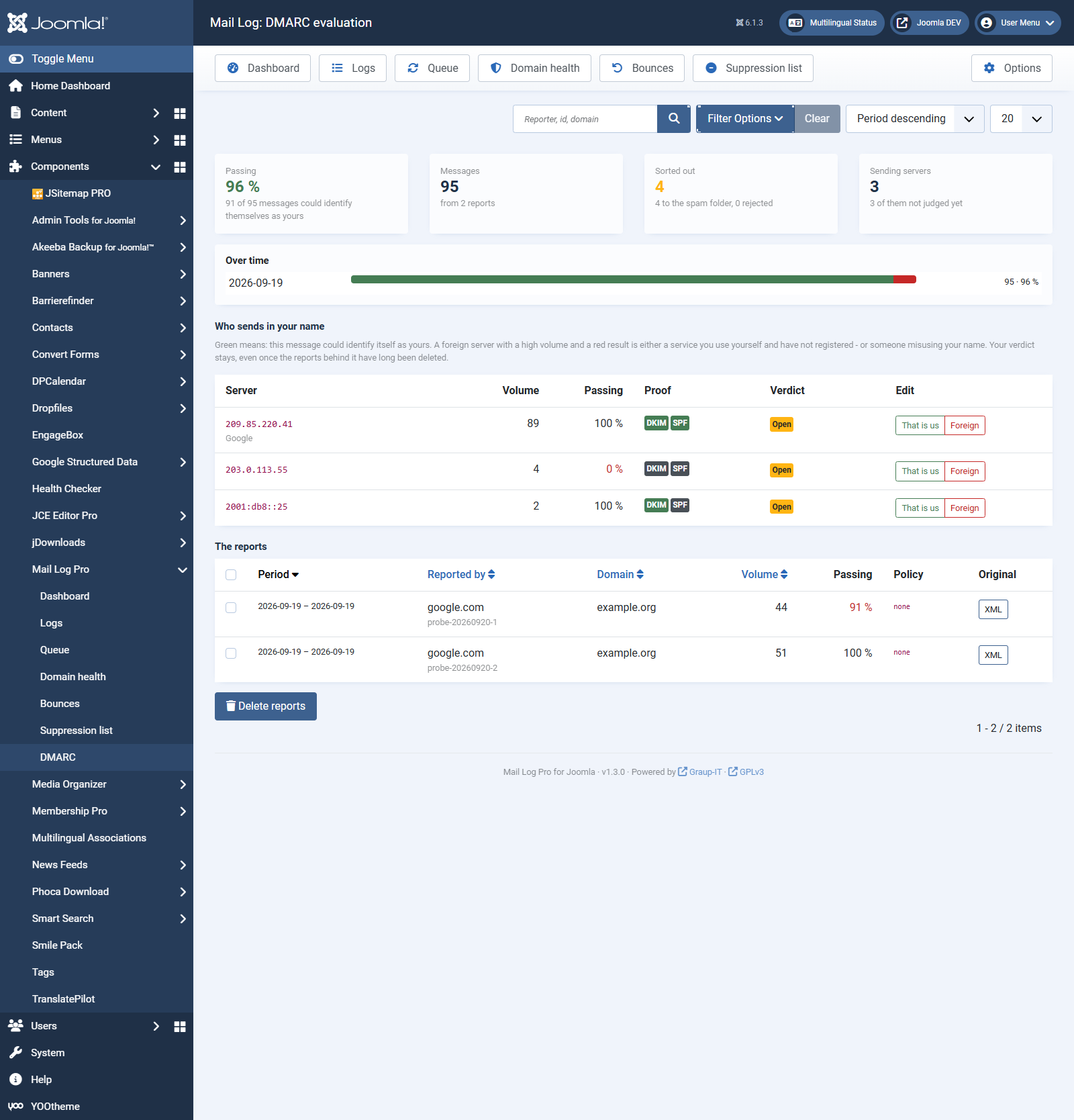
The screen reads from top to bottom as one answer in three stages.
The figures
Who sends in your name
The second list is the actual work. It shows every server that sent mail carrying your domain, with volume, passing share and — where it can be resolved — its name. Mail Log recognises well known sending services and labels them.
Every row gets a verdict from you:
The verdict is yours and it stays, even once the reports the address came from have long fallen to the retention period.
One of your own services with a red share is the most common find. It almost never means an attack; it means a missing record: the newsletter service is not in your SPF record, or its DKIM key is not published. Domain health shows you both, with the finished record to copy.
The reports
Last comes the list of reports that came in: period, reporter, domain, volume, share and the published policy. XML downloads the original document — for the case where a number looks odd and somebody wants to see what the provider actually wrote.
What else Mail Log does with the reports
Retention
Two periods, because these are two different things: the evaluated figures stay for a year by default — that makes the question “was it like this last summer?” answerable. The original document stays for three months; it is rarely needed and only for a short while. After that the report stays in the list, only without its attachment. The clean-up is done by the maintenance routine Clean up old log entries, which runs anyway.
When nothing arrives
The screen tells you why — it distinguishes four cases: the evaluation is off, the mailbox
collection is off, there is no scheduled task, or the site's task scheduler never runs at all. If
no notice is shown and the screen is still empty, check the rua= part of your DMARC
record: does it really point at the mailbox Mail Log collects from?
Reports for other domains. Mail Log stores every report it finds and names the domain it is about in the list. If a domain appears there that is not yours, somebody has entered your address as their report address — annoying, but harmless. The domain filter hides them.