
Using the sources in the builder
Assigning a source
- Open the page in the YOOtheme builder.
- Select the element that is to show the products — a grid or a card list, for example.
- Switch to the Advanced tab of the element. There you find the selector Dynamic Content.
- Open it and go to the group Graup-IT. Choose JTL Products for a list or JTL Product for exactly one product.
As soon as the source is selected, its settings appear underneath:
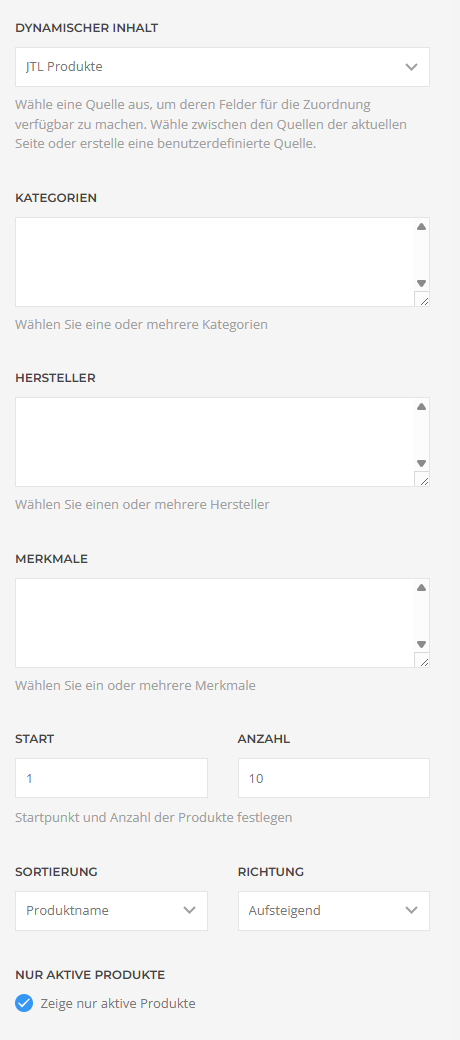
After that you map the element's fields to the fields of the source — title to name, image to main_image and so on. Which fields exist is listed under Fields and properties.
JTL Products
This source delivers several products. All filters can be combined; empty filters do not restrict anything.
| Categories | Multiple selection from the shop's categories. Only products belonging to one of the selected categories are returned. |
| Manufacturers | Multiple selection from the manufacturers. |
| Characteristics | Multiple selection from the characteristic values. Each is shown as Characteristic: value (number of products); characteristic values without products do not appear at all. |
| Offset | How many products are skipped. Default 0. |
| Count | How many products are returned at most. Default 10. |
| Sorting | Product name, article number, price or Date added. |
| Direction | Ascending or descending. |
| Visible products only | Hides products that are blocked in the shop for the configured customer group. Recommended for public pages. Default: on. |
What "visible" means here. JTL has no active flag on the article. If someone deselects an article for this shop in the ERP system, the next synchronisation deletes its record from the shop database — the extension cannot find such products at all any more. What the shop does maintain is a block per customer group: the product stays in the database but is not shown to certain customer groups. That is exactly what this switch filters on, against the customer group from the plugin options.
Your read-only user needs SELECT on tartikelsichtbarkeit for this.
If the table or the permission is missing, the extension still returns the products — unfiltered
then, with a notice in the Joomla backend and in the log.
Products with a release date in the future stay visible. That matches the shop, which also shows such articles and marks them as coming soon.
Set the count deliberately. Every product pulls in further queries for prices, images, attributes and variations while the page is being built — and those run against a remote database. A list of 200 products is noticeably slower than one of 12.
Search
The source also knows a search term that searches product name, description and article number. There is no input field for it in the form — the value is set through YOOtheme's dynamic parameters, from a URL parameter for instance. For a fixed list you do not need it.
JTL Product
This source delivers exactly one product. You pick it in the field Product from a list that shows article number – product name and is sorted by article number.
The list is limited to 500 products. If your shop has more, the product you are looking for may not be among them — build the page via JTL Products with a filter in that case.
Sorting and order
Sorting by price uses the shop's net price. Products without a price on record may end up at the front or at the back depending on the data — if the order matters, check the result with real data.
The selection lists stay empty
Categories, manufacturers, characteristics and the product list are built in the builder interface only, not on a regular page view — which saves several queries against the shop on every request. If they are empty, the database connection is usually not working: check it in the plugin settings with Test database connection.
Changes in the shop do not appear immediately
YOOtheme caches generated pages. After changes in the shop, clear the cache under YOOtheme → Settings → Advanced → Clear Cache. The same applies when you have created new categories or manufacturers in the shop and they are still missing from the builder's selection lists.
Applies to version 1.12.0.1.