# Reading the evidence: why is a file considered orphaned?
The detail view is the heart of Media Organizer — and the reason you can trust a classification without having to believe it. You open it by clicking the file name in the review view.
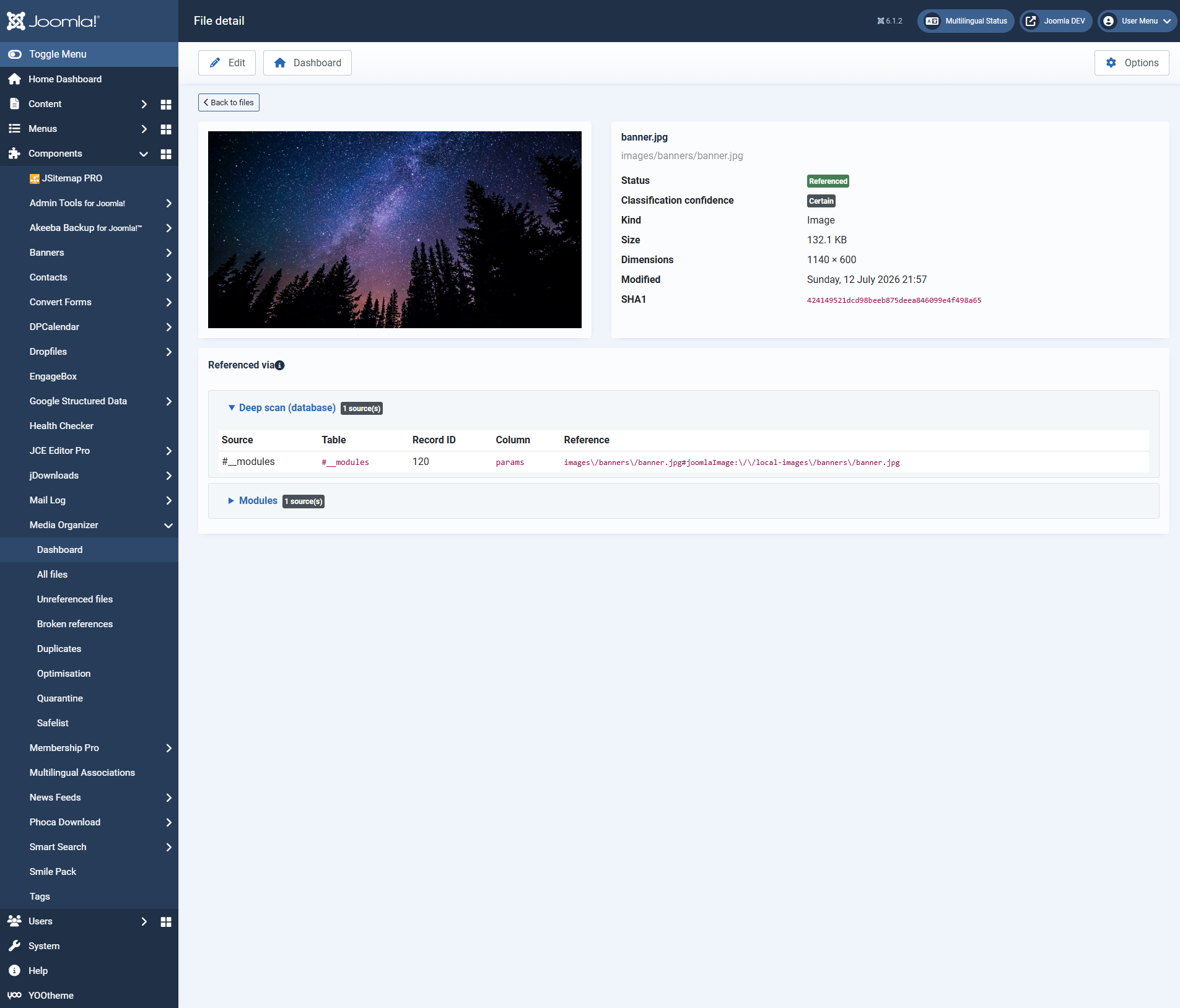 The detail view: the preview on the left, the metadata on the right, below them the occurrences with a direct edit link.## The header area
Status
Referenced, without a reference or in quarantine.
Classification confidence
How solid the classification is. "Certain" means: the search areas relevant for this file ran through completely.
Type, size, dimensions, modified
The usual key data.
SHA1
The checksum of the content. Media Organizer detects duplicates by it — and by it the deletion gate notices when a file has changed since the scan.
## "Referenced by" — the occurrences
Here you see *who* uses the file. The occurrences are grouped by search area, for example:
- **Articles (com\_content)** — the article the file appears in
- **Modules** — module HTML, parameters or folder parameters
- **Version history** — older versions of an article
- **Deep scan (database)** — the safety net that searches the database broadly
- **Extension profiles** — occurrences in third-party extensions
Every row shows the **source** (for example "Article #3 'Welcome to your blog'"), the **table** and the **record**, the **column** as well as the **reference** found in the original text. On the right an **edit link**leads straight to that content — useful when you want to remove or correct a reference.
Several search areas may report the same occurrence. That an article provider *and* the deep scan report the same file is not a fault but two independent pieces of evidence for the same statement.
## Why a file counts as "without a reference"
If none of the enabled search areas finds a reference, the file counts as unreferenced. The detail view then shows which areas were checked — and thereby also what was *not* checked.
This is exactly where a second look pays off:
- Are all relevant **search areas enabled**? Switching off the deep scan gives you more candidates — and less certainty.
- Is there a **coverage notice**? Then knowledge about an installed extension is missing.
- Might the file be used **outside Joomla**, in a newsletter, a PDF or from another website? No software can know that. That is what quarantine and the 404 monitoring are for.
## Folder references: the most important special case
Some extensions do not point to a file but to a **whole folder** — a random-image module showing "all images from `images/banner`", for instance.
Media Organizer treats such a folder reference as fully valid: **all** files below it count as used, even if none is named individually. Otherwise a single module would be enough to make half an image directory look orphaned by mistake.
## Derivatives
Many images have automatically generated variants — thumbnails, scaled-down versions, responsive sizes. Media Organizer recognises such derivatives and treats them like the original: if the original is in use, the derivative counts as used as well. That way no thumbnail disappears whose original is still needed.
## Where to go from here
- [Quarantine, restoring, deleting for good](https://docs.graup-it.de/books/media-organizer-en/page/quarantine-restoring-deleting-for-good)
- [Common questions and troubleshooting](https://docs.graup-it.de/books/media-organizer-en/page/common-questions-and-troubleshooting)
Applies to version 1.2.0.
[Deutsche Fassung](https://docs.graup-it.de/link/64)