# Quick start: the first scan
A scan rebuilds the inventory of your media files and searches for references to them. It is harmless:
**A scan never writes to the file system.** It reads, compares and writes the result to the database. Nothing is moved, nothing renamed, nothing deleted.
## Starting the scan
Open **Components → Media Organizer** and click **Scan**. The scan runs in steps and shows its progress; on larger websites you can abort it and continue later.
How long it takes depends mainly on the number of media files and the size of your database. On a typical medium-sized website it is seconds to a few minutes.
## Reading the dashboard
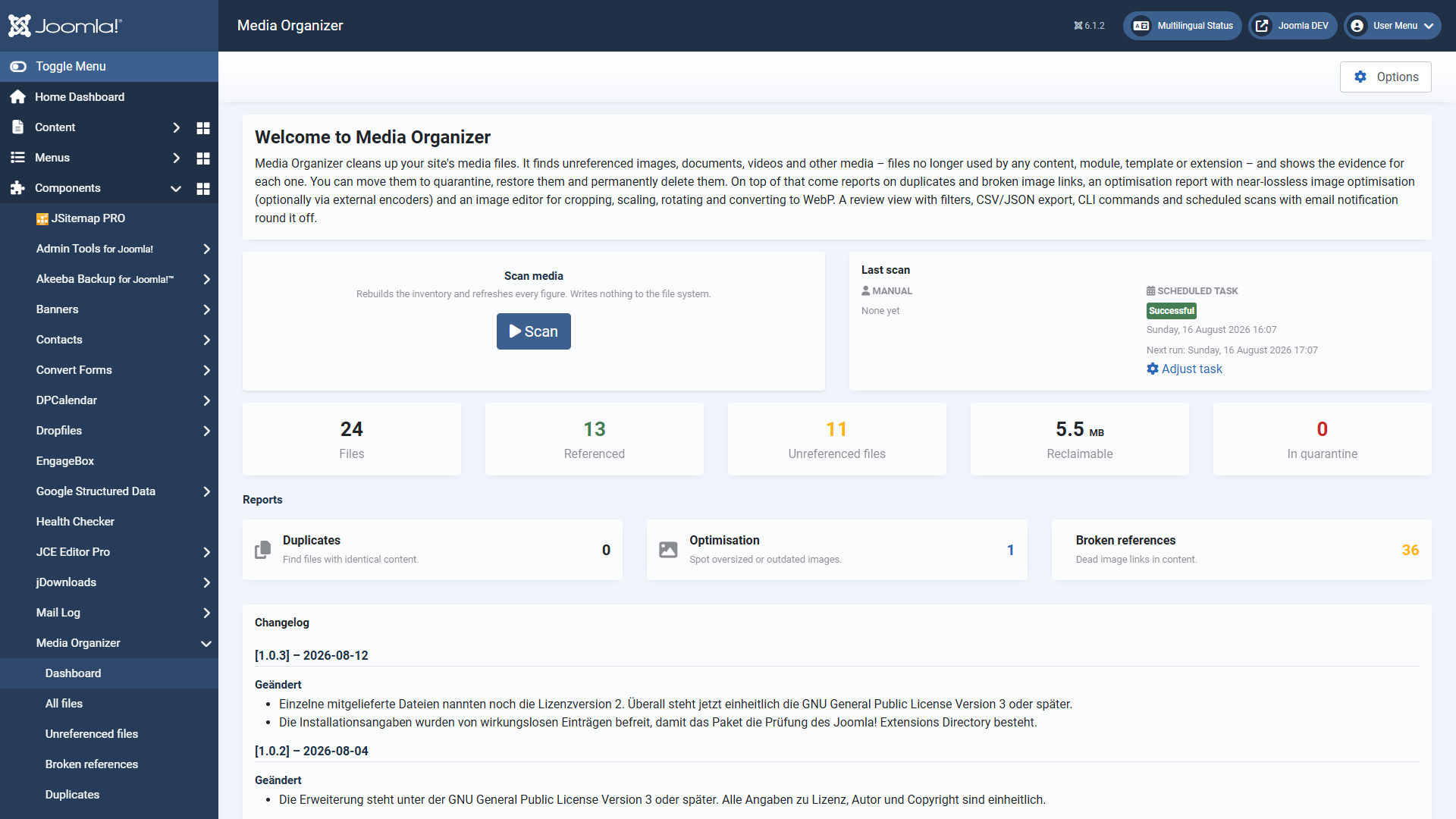 After the scan the dashboard sums up the result.
Figure
Meaning
**Files**
All media files recorded in the configured media folders.
**Referenced**
Files for which at least one occurrence was found. These are in use.
**Files without a reference**
Files for which *no* occurrence was found. These are candidates — not a verdict. Check them before you act.
**Reclaimable**
How much space the unreferenced files occupy together.
**In quarantine**
Files already moved, waiting to be restored or deleted for good.
**"Without a reference" does not mean "superfluous".** It means: nothing was found in any of the enabled search areas. If a file is used somewhere that is not covered yet, it appears here as well. That is exactly what the evidence is for — and exactly why Media Organizer deletes nothing by itself.
## The three reports
- **Duplicates** — files with identical content (same checksum), images uploaded more than once, for instance.
- **Optimisation** — images that are considerably larger than necessary.
- **Broken references** — content pointing to a file that does not (any longer) exist. Dead image links, in other words. Nothing is deleted here; the list is for repairing.
## What you should do now
Resist the temptation to push everything unreferenced into quarantine straight away. A sensible first pass looks like this:
1. Open **Files without a reference**.
2. Look at **a few files in detail** — the evidence shows you everywhere that was searched. That gives you a feel for whether the coverage fits your website.
3. Watch out for a notice about **incomplete coverage**. If it appears, an installed extension is not covered yet — then the list has to be taken with care, and deleting for good is blocked anyway.
4. Start with a **small, unambiguous selection** and move it to quarantine. Watch your website for a few days. Then the rest.
## Automating scans
Scans can run regularly through the Joomla task scheduler and inform you by email. The scheduled scan can only *find and report* — it never moves or deletes anything. There is deliberately no automatic cleanup.
## Where to go from here
- [The review view](https://docs.graup-it.de/books/media-organizer-en/page/the-review-view)
- [Reading the evidence](https://docs.graup-it.de/books/media-organizer-en/page/reading-the-evidence-why-is-a-file-considered-orphaned)
Applies to version 1.4.2.
[Deutsche Fassung](https://docs.graup-it.de/link/62)