# Looking at an entry
Clicking an entry — on the time, the subject or the view button — opens the detail view with everything recorded about that mail.
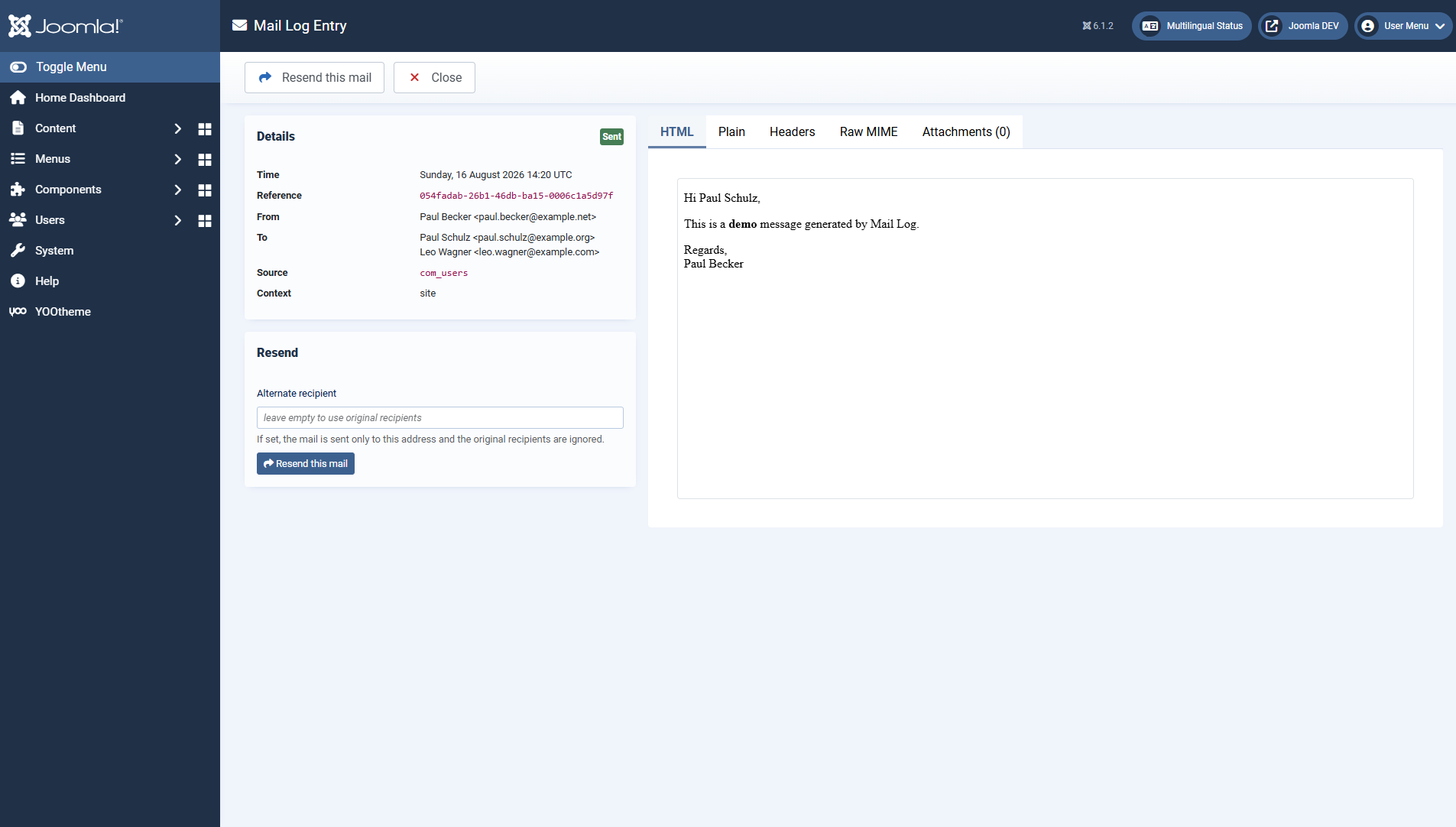 The metadata on the left, the content in several tabs on the right.## The metadata
The left column sums up what is known about the mail:
- status, time and a unique **reference** ID
- sender as well as **to**, **CC**, **BCC** and **reply-to**
- **source** (triggering extension) and **context** (frontend/backend/CLI/API)
- the **IP address** and the logged-in **user**, where available
- for errors, the full **error message** from the mail server
- a notice if the text was stored **truncated**
## The content tabs
Tab
Content
HTML
The HTML text, shown in an isolated preview (more on this below).
Text
The plain text version of the message.
Headers
The custom headers of the message.
Raw MIME
The exact RFC822 message, if storing it is enabled.
Attachments (n)
The captured attachments with name, type and size, ready to download.
The HTML text is displayed in an isolated frame (`sandbox`): scripts in the mail HTML are not executed, and the content cannot influence the backend. That way you can look at foreign messages safely.
## When there is no text
Depending on the settings, the body is deliberately not stored or stored only in part. In those cases a notice explains why:
- *"The body is stored encrypted and was decrypted for display."* — you see the plain text; in the database it is encrypted.
- *"For this entry only metadata is stored."* — typical for sensitive mails such as password resets.
- *"For this entry only the first 4 KB of the body are stored."* — the default stores a short excerpt; the size shown corresponds to the configured excerpt size.
Reading the bodies requires the permission *view mail content*. Without it you see the metadata but not the text.
## Downloading
With the permission *download attachments and .eml* you download the raw message as an **.eml** file through the toolbar (to open it in a mail client) as well as individual attachments from the tab of the same name.
## The sending chain
If a mail was resent, Mail Log links the new entry to the original one. The detail view shows this chain, so you can trace which sending came from which.
Applies to version 1.0.5.
[Deutsche Fassung](https://docs.graup-it.de/link/81)