# Domain health
Whether your e-mail arrives is often decided not in Joomla but in the **DNS of your domain**. If the usual records are missing there, large providers treat your messages as suspicious — they land in the spam folder or are rejected outright, and nobody tells you.
Mail Log checks those records for you and shows the result as a **status strip on the dashboard**. That strip answers one question — is something broken right now? — and for that it names the check and what it says, nothing more. Everything else lives on its own *Domain health* screen, which you reach from the strip, from the button at the top of the dashboard, or through *Components → Mail Log → Domain health*.
## The domain health screen
The screen has two areas, and they are visibly separated:
- **What was found for your domain** — at the top. The overall result, when it was last checked, and one card per check. This is where something may need doing.
- **Background reading** — below, on a grey ground. What the four terms mean, each with a link to the relevant standard, who creates the records, and how to go about it. There is nothing to set here.
What the cards at the top hold is where the two versions differ:
On the screen
Free version
Pro version
Which check, and whether it is fine
yes
yes
An explanation of what SPF, DKIM, DMARC and MX are
yes
yes
**What is actually in DNS** — the record itself, the closing rule, the policy, the key length, the MX servers
—
yes
**The finding in plain words**
—
yes
**What to do** about it — in plain words: which record goes where and what belongs in it. The parts only your provider knows, you fill in yourself
—
yes
**Where** such a record goes and which three fields to fill in
—
yes
So the Free version tells you *that* something is wrong and *where*. What to enter is what the Pro version adds.
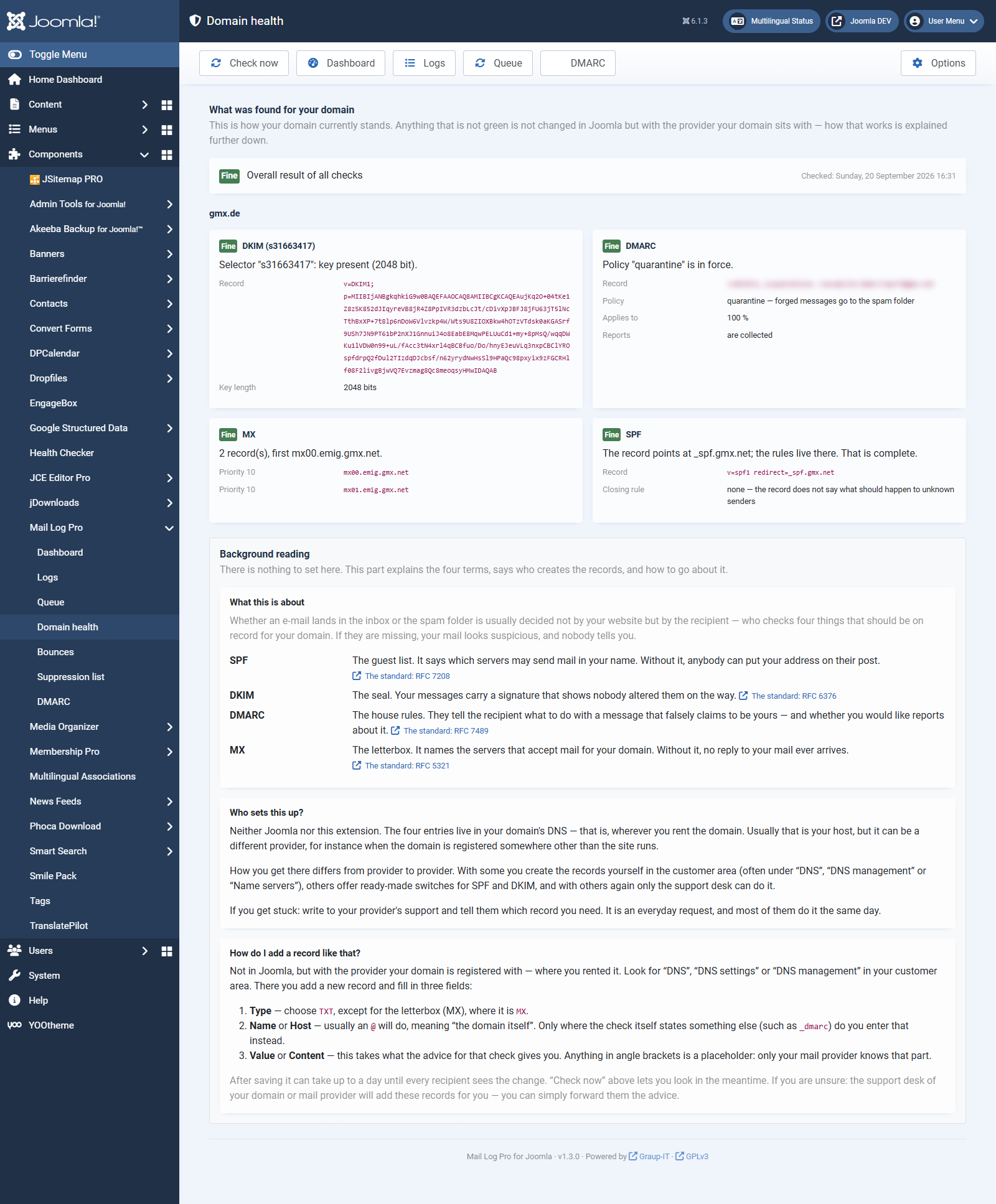 The Pro version shows, for each check, the record, the finding and what to do. 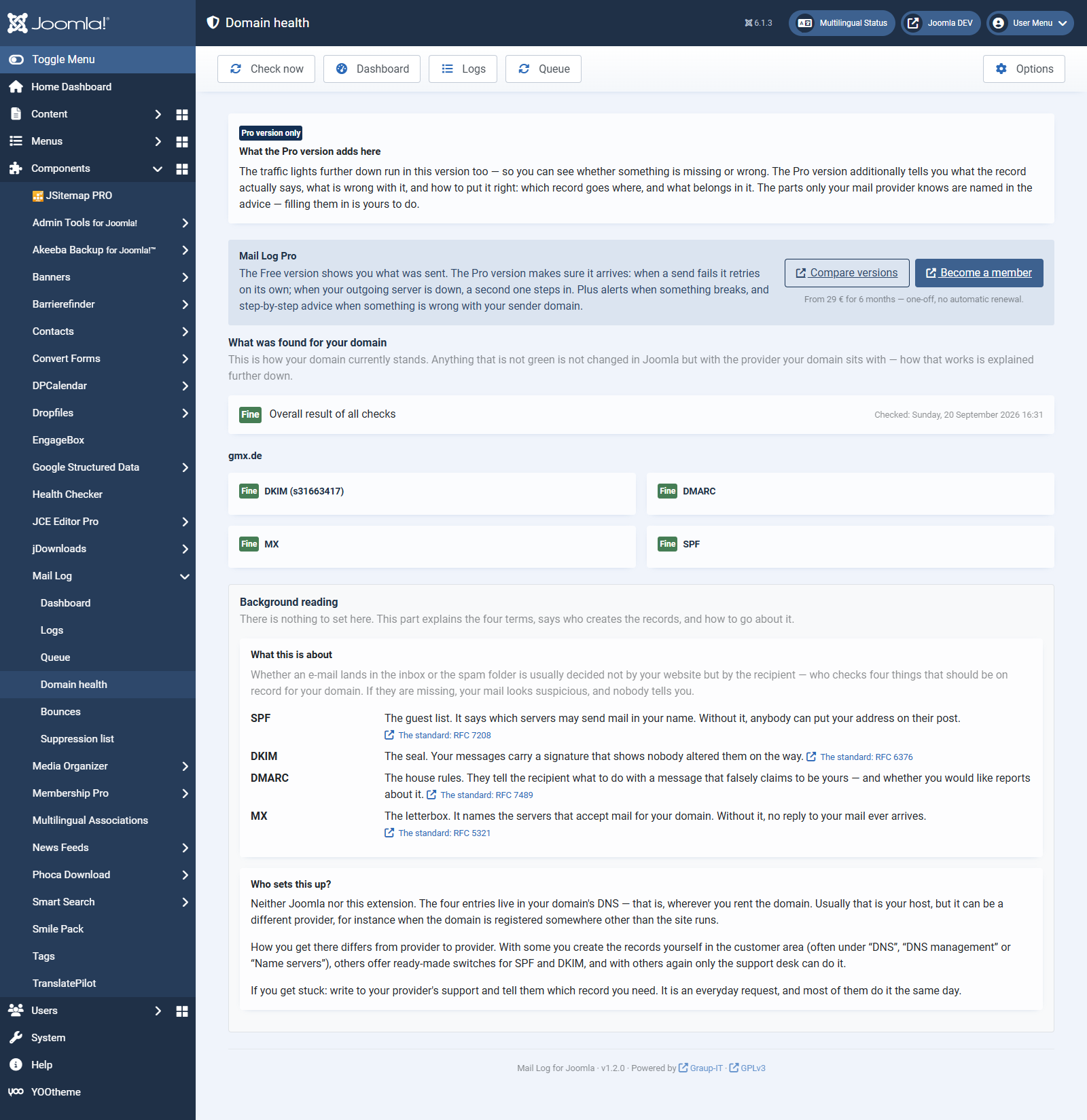 In the Free version you see which check is failing — and what the four terms mean.## What is checked
- **SPF** — states which servers may send in your name. Checked: that there is exactly one record, that it ends in a rule that actually rejects anything, and that it stays within the permitted number of lookups. That last one is the quiet failure: a record that is too elaborate looks right, but large providers abandon the evaluation before finishing it.
- **DKIM** — the digital signature on your messages. Checked: that a key exists for the selector you named, that it has not been revoked, and that it is long enough.
- **DMARC** — tells recipients what to do with forged messages. Checked: that a record exists, which policy it sets, and whether it collects reports.
- **MX** — whether your domain can receive replies at all.
## Setting it up
The check is on by default and runs once **the first time you open the dashboard**. So you see a result straight away, without setting anything up. Two steps are still worth taking:
1. *Pro version:* if you use the DMARC evaluation, this step is usually unnecessary — the reports name the selectors actually used for signing, and Mail Log checks them on its own. See the chapter *DMARC*.
2. **Enter your DKIM selectors** — in the *Options*, tab *Domain health*, one per line. Without them DKIM cannot be checked; selectors cannot be guessed. Your mail provider knows them; they are often called *default*, *mail* or *s1*.
3. In the *Scheduler*, create the task *Mail Log: check domain health*. Once a day is enough. Without it you are left with that single result from the first visit.
The *Check now* button in the dashboard status strip runs a check immediately — handy right after you have changed a DNS record.
The domain checked is the sender address from the Joomla configuration. To check a different domain, enter it in the same tab.
## The four things it can say
Shown as
Meaning
**Fine**
The record is present and coherent.
**Not set up**
There is no such record at all. Something has to be created — with the provider your domain sits with.
**Broken**
The record is there but wrong. Something that already exists has to be corrected. Both are red, because both affect your delivery today — the difference is whether you create something or change something.
**Please check**
It works but is not ideal — or something is missing without that necessarily being wrong. The mailbox (MX) is the typical case: a send-only domain without an MX record is allowed, but it cannot receive replies.
**Unknown**
The question could not be answered — for instance because your server does not allow DNS lookups, or the name service did not respond.
**Unknown is not a failure.** Mail Log deliberately tells "the record is missing" apart from "I could not look". Before reporting anything as broken it checks that your domain is reachable over DNS at all. If it is not, the last known result stays, rather than showing a red light that means nothing.
## Who sets these records up?
Neither Joomla nor Mail Log. The four entries live in your domain's DNS — that is, wherever you rent the domain. Usually that is your host, but it can be a different provider, for instance when the domain is registered somewhere other than the site runs.
How you get there differs from provider to provider. With some you create the records yourself in the customer area (often under *DNS*, *DNS management* or *Name servers*), others offer ready-made switches for SPF and DKIM, and with others again only the support desk can do it. If you get stuck: write to your provider's support and tell them which record you need. It is an everyday request, and most of them do it the same day.
The same note, together with the links to the standards, is on the *Domain health*screen itself, in the lower *Background reading* area.
## Privacy
Every check runs as a DNS lookup from your own server. No data is sent to checking services, reputation providers or any other third party, and no access key is needed.
Some providers switch DNS lookups off on shared servers. In that case Mail Log honestly reports *Unknown* rather than guessing. The task logs will tell you whether that is the reason.
## In the Pro version
**Pro version.** This feature is part of the Pro version of Mail Log. What the Free version does is covered under *Free version and Pro version*.
The Free version tells you *that* something is wrong. The Pro version adds:
- **What to do about it.** Under every finding that is not fine, the Pro version shows what to enter and where. That is the part a status light alone does not answer — knowing that your SPF record lacks a closing rule only helps if it also says that `~all` or `-all` belongs at the end.
- An alert as soon as a check turns from *Fine* to *Broken* or *Not set up* — so you find out without looking every day.
- Checking further domains, not only the sender domain from the Joomla configuration.
[Deutsche Fassung](https://docs.graup-it.de/link/305)