# Setting up the shop connection
You set up the connection once under *System → Plugins* in the entry *System - JTL Source*. The settings live in two tabs: *JTL Shop Database* and *Plugin Options*.
## First: create a database user of your own
**Do not use the shop's own database user.** Create a user on the shop's database server that is allowed to *read* only. The extension never writes — a user with write permissions would be a risk without any benefit.
An example for MySQL. Replace the schema name, the user name, the password and the address the access comes from:
```
CREATE USER 'joomla_read'@'203.0.113.10' IDENTIFIED BY 'a-long-password';
GRANT SELECT ON jtlshop.tartikel TO 'joomla_read'@'203.0.113.10';
GRANT SELECT ON jtlshop.tartikelmerkmal TO 'joomla_read'@'203.0.113.10';
GRANT SELECT ON jtlshop.tartikelsprache TO 'joomla_read'@'203.0.113.10';
GRANT SELECT ON jtlshop.tartikelpict TO 'joomla_read'@'203.0.113.10';
GRANT SELECT ON jtlshop.tartikelsichtbarkeit TO 'joomla_read'@'203.0.113.10';
GRANT SELECT ON jtlshop.tattribut TO 'joomla_read'@'203.0.113.10';
GRANT SELECT ON jtlshop.tattributsprache TO 'joomla_read'@'203.0.113.10';
GRANT SELECT ON jtlshop.teigenschaft TO 'joomla_read'@'203.0.113.10';
GRANT SELECT ON jtlshop.teigenschaftsichtbarkeit TO 'joomla_read'@'203.0.113.10';
GRANT SELECT ON jtlshop.teigenschaftsprache TO 'joomla_read'@'203.0.113.10';
GRANT SELECT ON jtlshop.teigenschaftwert TO 'joomla_read'@'203.0.113.10';
GRANT SELECT ON jtlshop.teigenschaftwertaufpreis TO 'joomla_read'@'203.0.113.10';
GRANT SELECT ON jtlshop.teigenschaftwertpict TO 'joomla_read'@'203.0.113.10';
GRANT SELECT ON jtlshop.teigenschaftwertsichtbarkeit TO 'joomla_read'@'203.0.113.10';
GRANT SELECT ON jtlshop.teigenschaftwertsprache TO 'joomla_read'@'203.0.113.10';
GRANT SELECT ON jtlshop.thersteller TO 'joomla_read'@'203.0.113.10';
GRANT SELECT ON jtlshop.tkategorie TO 'joomla_read'@'203.0.113.10';
GRANT SELECT ON jtlshop.tkategorieartikel TO 'joomla_read'@'203.0.113.10';
GRANT SELECT ON jtlshop.tmerkmal TO 'joomla_read'@'203.0.113.10';
GRANT SELECT ON jtlshop.tmerkmalwert TO 'joomla_read'@'203.0.113.10';
GRANT SELECT ON jtlshop.tmerkmalwertsprache TO 'joomla_read'@'203.0.113.10';
GRANT SELECT ON jtlshop.tpreis TO 'joomla_read'@'203.0.113.10';
GRANT SELECT ON jtlshop.tpreisdetail TO 'joomla_read'@'203.0.113.10';
GRANT SELECT ON jtlshop.tsprache TO 'joomla_read'@'203.0.113.10';
FLUSH PRIVILEGES;
```
**As of version 1.12.0 this list contains different tables than before.** Up to 1.11.0 it named two tables that do not exist in the JTL shop — the extension queried them, and the fields *attributes* and *variations* therefore always stayed empty. If you granted the permissions one by one, please add the new ones. If you used `GRANT SELECT ON jtlshop.*`, there is nothing to do.
The `t` at the start of the table names is the usual JTL prefix. If yours differs, adjust the names — and enter your prefix in the field *Table prefix* below.
If you prefer it simple, grant `GRANT SELECT ON jtlshop.*`. That is more generous than necessary, but still far better than a user with write permissions.
## Tab "JTL Shop Database"
| **Database host** | Address of the database server. If the shop is on the same server, usually `localhost`. |
| **Database name** | Name of the schema, for example `jtlshop`. |
| **Database user** | The read-only user you just created. |
| **Database password** | Shown masked in the form. On how it is stored, see below. |
| **Table prefix** | Default `t`. |
| **Database port** | Default `3306`. |
### Testing the connection
Above the first field sits the button *Test database connection*. Without saving, it checks:
- whether a connection can be established with these details,
- which MySQL version answers,
- how many tables carry your prefix,
- and whether one of the eight tables is missing without which a connection would be pointless.
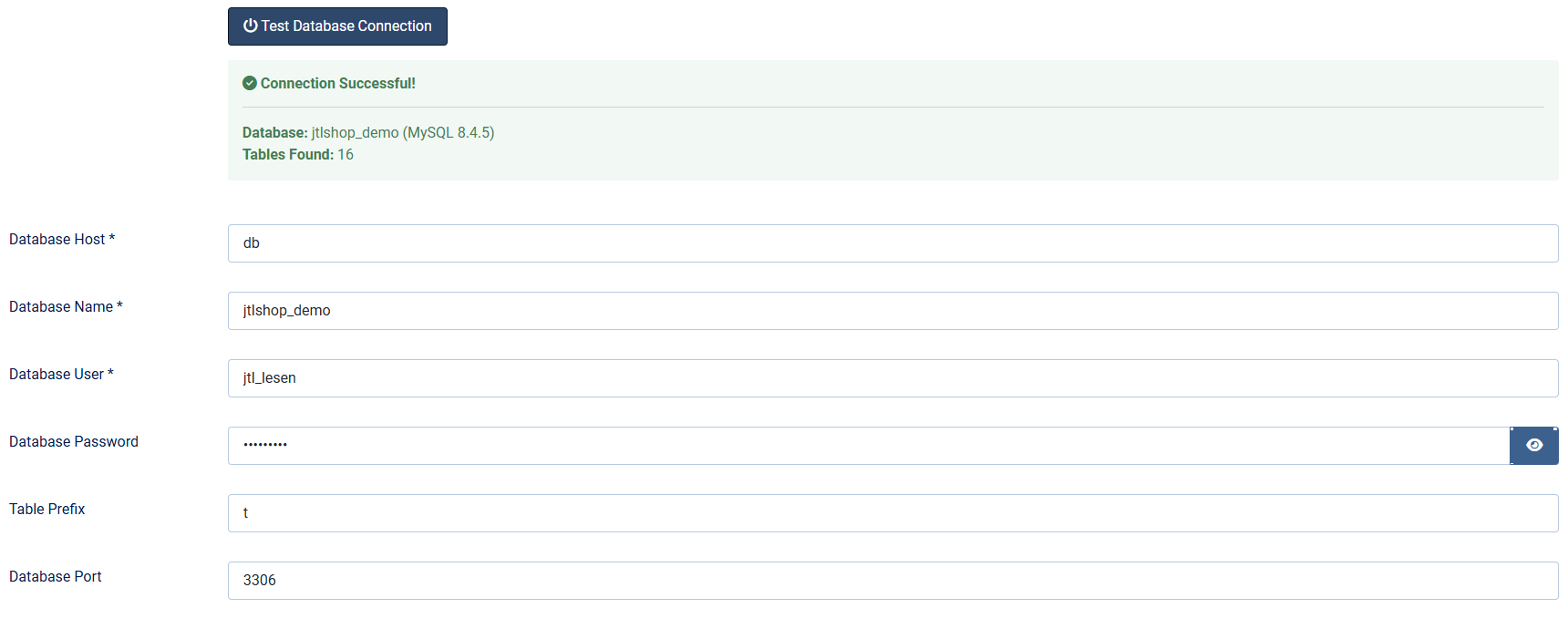
If tables are reported as missing, the prefix is usually wrong.
The test is only reachable for logged-in users who are allowed to manage extensions. Up to version 1.9.8 it could be called without logging in — **one more reason to update to 1.10.0**.
## Tab "Plugin Options"
| **Shop base URL** | Address of the shop, for example `https://shop.example.com`. The image and article addresses are assembled from it. If the field stays empty, the address of the Joomla website is used — and the images lead nowhere. |
| **Default currency** | Currency code for price output, default `EUR`. |
| **Default language** | ISO code of the language the article data is maintained in, default `ger`. It controls which translated attribute names are read. For an English-language shop, `eng`. |
| **Customer group** | The website reads the shop from the perspective of this customer group, default `1`. It determines two things: which price is output and which products count as visible. In most shops `1` is the default group — which one it is in yours can be seen in the shop backend under *Customers → Customer groups*. |

## Where the password ends up
Joomla stores plugin settings **unencrypted** in its own database. That applies to this password as well — Joomla offers nothing else for plugin parameters, and no extension can change that.
Hence the recommendation above: a dedicated user that may only read. Then the damage is limited should someone gain access to the Joomla database.
## Connections from outside
If shop and website are on different servers, the shop's MySQL server has to accept connections from outside. Narrow that down as far as you can:
- Bind the user to the IP address of your Joomla server — that is exactly what the `@'203.0.113.10'` part above does.
- Open port 3306 in the firewall for that single address only.
- Where possible, route the connection through a VPN or an SSH tunnel instead of the open network.
Applies to version 1.12.1.
[Deutsche Fassung](https://docs.graup-it.de/link/141)