# Backlinkseller (EN)

Brings your Backlinkseller advertising slots into the YOOtheme Pro page builder as an element · Version 2.7.5 · Stand 07.09.2026

# Backlinkseller at a glance

## What the extension does

The extension brings your Backlinkseller advertising slots into the YOOtheme Pro builder as an element of its own. You place the element where the links are to appear and style it like any other list in the builder — bullets, columns, spacing, link style.

Until now the slots had to be built in through a child theme or a custom template fragment. That is no longer necessary: the extension is a plugin that registers itself with the builder.

<div class="callout info" id="bkmrk-the-screenshots-in-t">The screenshots in this manual were taken on a German Joomla installation. The extension follows the language of your installation, so the labels appear in English on an English backend.

</div>## How the links reach the page

1. While the page is being built, the element asks the Backlinkseller service for the links intended for this exact page address.
2. The answer is taken apart: address, link text and the text before and after it are extracted from every entry.
3. The element outputs the entries as a list — in the style you set in the builder.
4. The result is cached so that not every page view triggers a new request. For how long is up to you.

## What you need for it

- An account at [backlinkseller.de](https://www.backlinkseller.de/?referrer=542949815) with an ID of your own
- Joomla 6 and PHP 8.3
- YOOtheme Pro 4.5 or 5.x as the active template

<div class="callout info" id="bkmrk-a-child-theme-is-not">A child theme is **not** required. An existing one does no harm either.

</div>## What you can configure

The credentials live centrally in the plugin settings, not on the individual element: ID, channel, cache lifetime and optionally a fixed page address. The appearance, by contrast, is set per element in the builder — so you can present the same account differently on different pages.

The details are under [Plugin settings](https://docs.graup-it.de/books/backlinkseller-en/page/plugin-settings) and [Using the element in the builder](https://docs.graup-it.de/books/backlinkseller-en/page/using-the-element-in-the-builder).

## Important before you go live

The Backlinkseller service is contacted unencrypted, and every request transmits the visitor's IP address and the requested page address to the service. Both have consequences for your privacy policy. Please read [Privacy and security](https://docs.graup-it.de/books/backlinkseller-en/page/privacy-and-security) before enabling this on a public website.

<small>Applies to version 2.7.5.</small>

[Deutsche Fassung](https://docs.graup-it.de/link/129)

# Requirements and installation

## Requirements

- **Joomla:** 6.0 or newer
- **PHP:** 8.3 or newer
- **YOOtheme Pro:** 4.5 or 5.x, installed and active as the site template
- **Backlinkseller account** with an ID of your own

<div class="callout info" id="bkmrk-the-extension-works-">The extension works without Joomla's compatibility plugin. If you have enabled it for other reasons, that does no harm — it is simply not needed here.

</div>## Installation

1. Download the installation package `plg_system_backlinkseller-x.y.z.zip` from your customer account on [graup-it.de](https://www.graup-it.de).
2. In the Joomla backend, open *System → Install → Extensions*.
3. Drag the ZIP file into the upload area or select it via *Browse*.

On a first installation the plugin is enabled automatically. You will find it afterwards under *System → Plugins* as *System - Backlinkseller*.

![The plugin list with the enabled entry „System - Backlinkseller](https://docs.graup-it.de/uploads/images/gallery/2026-08/AQxdoku-02-pluginliste.png)

After the installation an overview panel appears showing the installed version and the entry points to Getting started, Download key and Manual. After an update, the changelog takes the place of "Getting started".

![The overview panel after an update, with the version number and the cards What's new, Enable updates and Help](https://docs.graup-it.de/uploads/images/gallery/2026-08/4xDdoku-01-installationspanel.png)

<div class="callout warning" id="bkmrk-if-the-environment-d">If the environment does not fit — Joomla too old, PHP too old — the installation stops with a clear message instead of leaving behind an extension that silently fails later.

</div>## After the installation

1. Enter your Backlinkseller ID in the plugin settings — see [Plugin settings](https://docs.graup-it.de/books/backlinkseller-en/page/plugin-settings). Without it the element delivers nothing.
2. Clear the YOOtheme cache: *YOOtheme → Settings → Advanced → Clear Cache*.
3. Open a page in the builder — the element browser now shows the element *Backlinkseller* under *Graup-IT*: ![The element browser of the builder with the group Graup-IT and the element Backlinkseller](https://docs.graup-it.de/uploads/images/gallery/2026-08/A7Jdoku-04-elementbrowser.png)
4. Enter your download key for automatic updates — see [Download key and updates](https://docs.graup-it.de/books/backlinkseller-en/page/download-key-and-updates).

## Uninstalling

Uninstall the plugin via *System → Manage Extensions*. The extension creates no database tables of its own; nothing is left behind. Elements you have placed in the builder lose their output afterwards — remove them from the affected pages beforehand.

<small>Applies to version 2.7.5.</small>

[Deutsche Fassung](https://docs.graup-it.de/link/130)

# Download key and updates

Backlinkseller receives updates through the official Joomla update mechanism. To allow your website to fetch them, enter your personal download key once.

## Entering the download key

1. Create your download key in your customer account on [graup-it.de](https://www.graup-it.de) (menu item *Download IDs*). One key applies per website and covers all extensions obtained through it.
2. In the backend, open *System → Update → Update Sites*.
3. Open the entry *Backlinkseller Updates* and enter the key into the field *Download Key*.
4. Save.

<div class="callout warning" id="bkmrk-make-sure-to-paste-t">Make sure to paste the key **without leading or trailing spaces**. A space copied along with it makes the update fail with an error message ("URL rejected" or "Package download failed").

</div>## Installing updates

1. Open *System → Update → Extensions*.
2. If a new version is available, Backlinkseller appears in the list. Select it and click *Update*.
3. Joomla downloads the package using your download key, verifies the checksum and installs the new version. Your settings and your builder layouts are preserved.

If Joomla finds no update although a new version exists, click *Check for Updates* first to refresh the cache.

## The manual route

You can also install any version by hand: download the ZIP and install it via *System → Install → Extensions*, just like the first installation. An update through the package overwrites the existing installation and keeps your settings.

<small>Applies to version 2.7.5.</small>

[Deutsche Fassung](https://docs.graup-it.de/link/131)

# Plugin settings

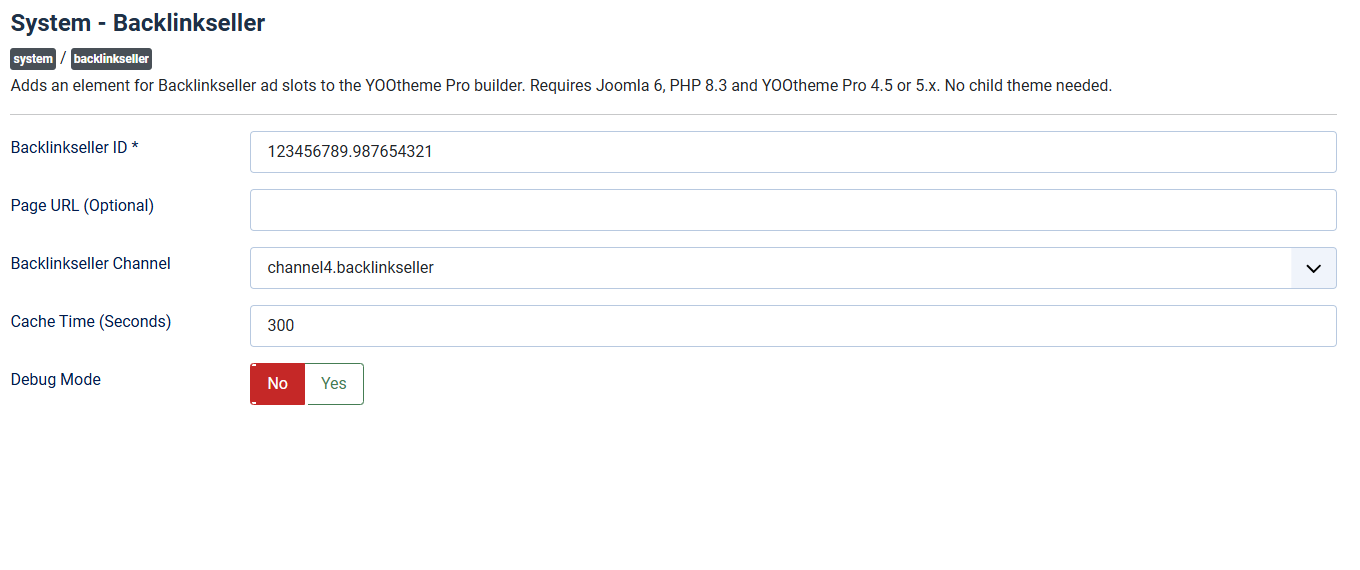
The credentials live centrally in the plugin, not on the individual element. You find them under *System → Plugins* in the entry *System - Backlinkseller*.
![The plugin settings with the fields Backlinkseller ID, page URL, Backlinkseller channel, cache time and debug mode](https://docs.graup-it.de/uploads/images/gallery/2026-08/0b1doku-03-einstellungen.png)

## Backlinkseller ID

Your ID from [backlinkseller.de](https://www.backlinkseller.de/?referrer=542949815), for example `123456789.987654321`. You find it in your Backlinkseller account. **Without it the element delivers nothing** — in debug mode a corresponding notice appears, in normal operation the slot simply stays empty.

Only digits and dots are accepted; everything else is discarded before the request.

## Page URL (optional)

Backlinkseller assigns the links to a page address. Leave the field **empty** and the extension reports the address actually being requested — that is the normal case and right for most websites.

Enter a fixed address here only if all advertising slots are to be assigned to the same address regardless of the page being viewed.

<div class="callout warning" id="bkmrk-a-fixed-address-appl">A fixed address applies to the whole website. If you place the element on several pages, they all report the same address to Backlinkseller — and receive the same links.

</div>## Backlinkseller channel

The channel determines which server the request goes to: `channel1` through `channel9`. The default is `channel4`. Change the value only if Backlinkseller explicitly asks you to.

## Cache time (seconds)

How long an answer once fetched is reused before asking again. Default: **300 seconds** (5 minutes), permitted are 0 to 3600.

- **Higher value:** fewer requests, faster page build, but changes at Backlinkseller take effect later.
- **0:** switches the cache off. Then *every* page view asks again. Useful for testing only — in production it costs noticeable time.

The cache is shared by all visitors, not kept per visitor. It is keyed by ID, page address and channel.

## Debug mode

Shows the unprocessed answer of the service in the element, the entries derived from it and any error messages. **It also switches the cache off.**

<div class="callout danger" id="bkmrk-switch-it-on-for-tes">Switch it on for testing only, and off again afterwards. In debug mode visitors see technical output, and every page view triggers a request of its own.

</div>## What the element itself brings along

Everything to do with appearance — list type, bullets, columns, text style, link style, separator — is set on the element in the builder, not here. See [Using the element in the builder](https://docs.graup-it.de/books/backlinkseller-en/page/using-the-element-in-the-builder).

<small>Applies to version 2.7.5.</small>

[Deutsche Fassung](https://docs.graup-it.de/link/132)

# Using the element in the builder

## Inserting the element

1. Open the page in the YOOtheme builder.
2. Add a new element and choose the group *Graup-IT* → *Backlinkseller* in the element browser.
3. Save the page and open it in the frontend — the links appear there.

![The element browser of the builder with the group Graup-IT and the element Backlinkseller](https://docs.graup-it.de/uploads/images/gallery/2026-08/A7Jdoku-04-elementbrowser.png)

<div class="callout info" id="bkmrk-inside-the-builder-y">Inside the builder you usually do not see the links: the request depends on the address of the page being viewed, and the preview has a different one. To check the setup there is *test mode*, see below.

</div>## Test mode

The switch *Test mode* on the element replaces the list of links with an overview of the values arriving from the plugin settings: ID, channel, page address, cache lifetime and debug state. If no ID is stored, it says so explicitly.

This is how you check whether the element sees the settings — without depending on a real answer from the service. **Switch it off again before publishing.**

## Appearance

The element follows the styling of the YOOtheme list element. You set:

- **Type:** below each other (*vertical*) or side by side (*horizontal*).
- **Marker** and **Marker Color:** bullet and its colour — for the vertical layout only.
- **Style** and **Size:** dividers, stripes, font size.
- **Separator:** the character between entries — for the horizontal layout only. The default is a comma followed by a space.
- **Columns**, **Columns Breakpoint** and **Divider:** multi-column wrapping from a given screen width, optionally with a dividing line.
- **HTML Element:** `ul` or `ol`. With the option next to it the list is additionally wrapped in a `<nav>` — useful if the links are meant to count as a navigation block.
- **Content Style** and **Link Style:** text style of the entry and style of the link.

On top of that come the usual YOOtheme settings for spacing, width, alignment, animation and visibility.

## How an entry is put together

Backlinkseller usually delivers one link per entry with some text before or after it. The extension separates the two and outputs them in this order: text before, link, text after. If an entry contains no usable link, it appears as plain text.

Only the address, the link text and the attributes `rel`, `target` and `title` are taken from the link. Everything else in the answer is discarded — that is a security measure, see [Privacy and security](https://docs.graup-it.de/books/backlinkseller-en/page/privacy-and-security).

## Several elements on one page

You can place the element more than once. All elements share the same plugin settings and therefore the same request — so they show the same links, but they can be styled differently.

<small>Applies to version 2.7.5.</small>

[Deutsche Fassung](https://docs.graup-it.de/link/133)

# Privacy and security

This page sums up what you as the operator need to know before the extension runs on a public website. The points come from the security audit for version 2.7.0.

## Which data leaves your server

Every request to the Backlinkseller service transmits:

- your **Backlinkseller ID**
- the **page address being requested**
- the **visitor's IP address**

<div class="callout warning" id="bkmrk-this-is-relevant-und">**This is relevant under data protection law.** An IP address is personal data. Include the transfer to Backlinkseller in your privacy policy and check whether you have a legal basis for it. This extension does not make that decision for you.

</div>According to the imprint of backlinkseller.de the recipient is **Intelions OÜ**, Pae 25-47, 11414 Tallinn, Estonia. Estonia is an EU member state — so this is not a transfer to a third country. You need the name to identify the recipient in your privacy policy.

The IP address is taken from the connection itself and never read from request headers — it therefore cannot be forged from outside.

## Cache and IP address

The cache is keyed by ID, page address and channel, **not by visitor**. As long as an answer sits in the cache, no request is made — and therefore no IP address is transmitted. A higher cache time thus reduces the amount of data passed on.

## Unencrypted connection

The request goes over `http://`. That is not negligence on the part of the extension but a constraint of the service: the request servers `channel1` through `channel9` accept **unencrypted connections only** — port 443 is not open there, a connection attempt is refused. (The website backlinkseller.de itself is reachable over `https`; the request servers are not.) The provider's own official integration code addresses port 80 as well.

Whoever controls the connection in between could in theory alter the answer.

What such an interference could achieve is deliberately kept narrow. The extension does **not** adopt the answer as HTML but reads out individual values on purpose:

- Addresses are validated; only `http` and `https` are allowed. `javascript:` and similar addresses are excluded.
- Fixed lists of permitted values apply to `rel` and `target`.
- All remaining text is stripped of any markup.
- All output is escaped. Scripts, event attributes or embedded frames cannot reach the page this way.
- The answer is limited to 100 KB and 100 entries.

**A residual risk remains:** an attacker in that position could substitute links other than those Backlinkseller intended. As long as the service offers no TLS, that cannot be ruled out from this side.

## Availability

If the service does not answer, the extension tries a second address and then gives up. Each attempt waits at most 5 seconds — **so in the worst case the page build takes about 10 seconds longer**.

Error responses are deliberately **not** cached, so that a disruption recovers by itself as soon as the service is reachable again. The flip side: while the disruption lasts, every page view pays that time.

<div class="callout info" id="bkmrk-if-the-service-is-un">If the service is unreachable for a longer period, take the element off the page temporarily or disable the plugin. Raising the time limit does not help — it limits the damage, it does not cause it.

</div>## What the extension does not do

- It creates no database tables of its own and stores no visitor data.
- It sets no cookies.
- It fetches nothing as long as no element is placed on the page.

<small>Applies to version 2.7.5.</small>

[Deutsche Fassung](https://docs.graup-it.de/link/134)

# Common questions and troubleshooting

## The element does not appear in the builder

1. Is the plugin enabled under *System → Plugins*?
2. Is YOOtheme Pro active as the site template? Without YOOtheme the plugin has no effect — that is by design, not a malfunction.
3. Clear the YOOtheme cache: *YOOtheme → Settings → Advanced → Clear Cache*. The element browser is cached.
4. Look in the element browser under the group *Graup-IT*, not among the standard elements.

## The element is there, but no links appear

Switch on *test mode* on the element and look at the page in the frontend. The overview shows which values arrive.

- **"Not configured" for the ID:** enter the Backlinkseller ID in the plugin settings.
- **ID is there, still no links:** additionally switch on debug mode in the plugin. The cause then appears in plain text — see the next section.

<div class="callout warning" id="bkmrk-switch-both-off-agai">Switch both off again after troubleshooting. Debug mode disables the cache, test mode replaces the list of links with the overview.

</div>## The messages in debug mode

- **"Backlinkseller ID is not configured":** the ID is missing from the plugin settings.
- **"Could not connect to Backlinkseller":** neither the German nor the international address answered within 5 seconds. Possible reasons: the service is disrupted, your server does not allow outgoing connections, or a firewall blocks port 80.
- **"Invalid response from the Backlinkseller server":** an answer arrived, but not in the expected format. Check the ID and the channel.

## The page shows different links than expected

Backlinkseller assigns the links to the page address reported to it. Check in test mode which address is being reported. If a fixed *page URL* is set in the plugin, it applies to all pages alike — clear the field so that every page reports its own address.

## Changes at Backlinkseller take effect late

That is the cache. Wait out the configured cache time (default 5 minutes) or clear the Joomla cache under *System → Clear Cache*.

## The page builds noticeably more slowly

Most likely the service is not answering at the moment. Every request waits up to 5 seconds, and there is a second attempt on a different address. Error responses are not cached so that the situation recovers by itself — but while the disruption lasts, that costs time on every page view. More on this under [Privacy and security](https://docs.graup-it.de/books/backlinkseller-en/page/privacy-and-security).

Also check whether the cache time was accidentally set to `0` or debug mode is still active — both switch the cache off.

## Do I have to create a child theme?

No. The extension registers itself with the builder. An existing child theme does no harm either.

## Do I need the Joomla compatibility plugin?

No. The extension uses only interfaces that Joomla 6 provides without that plugin.

## Does the extension work with Joomla 5?

No. From version 2.7.0 on, Joomla 6 and PHP 8.3 are required. On older installations the installation stops with a notice instead of setting itself up and failing later.

<small>Applies to version 2.7.5.</small>

[Deutsche Fassung](https://docs.graup-it.de/link/135)

# Changelog

This changelog lists every released version of Backlinkseller, the most recent first.

<div class="callout info" id="bkmrk-this-page-is-generat">This page is generated automatically from the product's changelog file when a release is made. Changes made by hand are lost at the next synchronisation.

</div>## Version 2.7.5 – 16 August 2026

### Fixed

- The links in the overview panel always led to the German manual. They now follow the configured language.

## Version 2.7.4 – 14 August 2026

### Fixed

- The notice in test mode still named the extension by its old name and therefore led to a settings page that no longer exists.

### Language

- The test mode display and the messages of the element always appeared in German. They now follow the configured language and are available in German and English.

## Version 2.7.3 – 1 August 2026

### Fixed

- The link "Open manual" in the overview panel went through a redirect. It now points to the documentation directly.

## Version 2.7.2 – 1 August 2026

### Changed

- In the extension manager the extension is now called "System - Backlinkseller"; the internal name suffix is gone. Nothing changes about its function or settings.

## Version 2.7.1 – 1 August 2026

### Fixed

- New versions did not appear in the extension manager: the registration with the update server was missing from the package. Version 2.7.0 has to be updated by hand once.

## Version 2.7.0 – 31 July 2026

### Added

- After an installation or update an overview panel appears with version, status and entry points to getting started, download key and manual.
- The plugin is enabled automatically on a first installation.
- The extension registers with the update server: new versions will appear in the extension manager directly.
- The extension manager now shows the list of changes behind the version number.
- The full licence text is now included; none was shipped before.

### Changed

- The extension is licensed under the GNU General Public License version 3 or later.
- Internal rework onto the current Joomla extension pattern. Nothing changes for daily use.
- The extension requires Joomla 6 and PHP 8.3 and runs without the compatibility plugin. On older installations the installation script stops with a clear message.

### Fixed

- The advertising slots would have stayed empty from Joomla 7 on: the answer of the Backlinkseller service was read in a way Joomla no longer offers.

### Language

- The messages shown during installation and update are available in German and English.

## Version 2.6.0 – 6 June 2026

### Notes

- The state before the extension joined the shared workshop.

[Deutsche Fassung](https://docs.graup-it.de/link/136)